Chapter 3 How to Automate the Network?
For diagrams, tables, or exact code formatting, .
VS Code is an extremely powerful text editor and much more. Many extensions are available to enhance Ansible, YAML, Jinja2, Python, and Git readability. VS Code is the main workspace for the modern network engineer writing data models, dynamic templates, tasks, and playbooks.
A lot of the actions in VS Code are Git commands but done through GUI actions. Git is used under the covers to clone repositories locally, change to working branches, make commits, push code to the remote repository, and pull updates from the remote branch. VS Code simplifies development eliminating the need to know these commands.
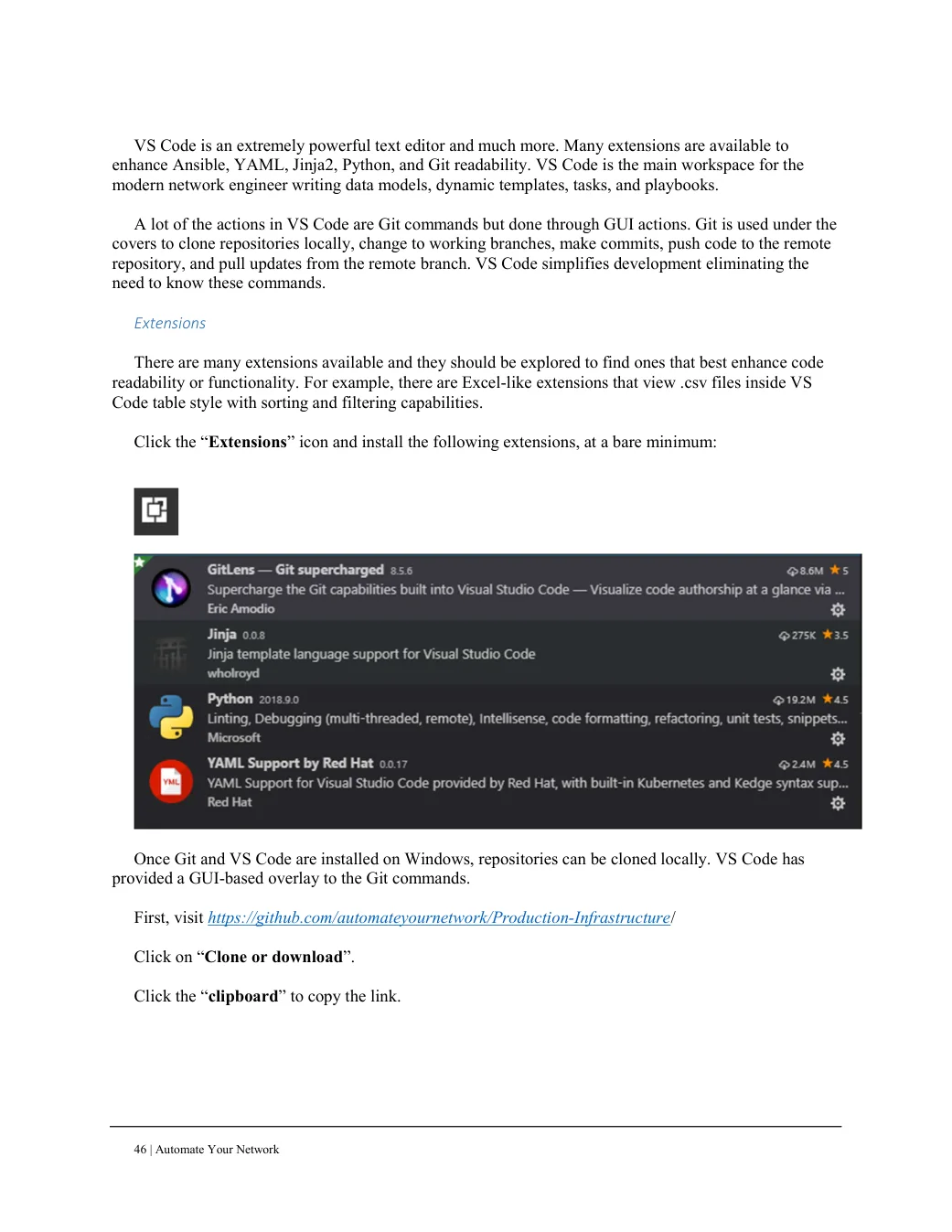
Extensions There are many extensions available and they should be explored to find ones that best enhance code readability or functionality. For example, there are Excel-like extensions that view .csv files inside VS Code table style with sorting and filtering capabilities.
Click the “Extensions” icon and install the following extensions, at a bare minimum:
Once Git and VS Code are installed on Windows, repositories can be cloned locally. VS Code has provided a GUI-based overlay to the Git commands.
First, visit https://github.com/automateyournetwork/Production-Infrastructure/ Click on “Clone or download”. Click the “clipboard” to copy the link.